Excel Productivity Utilities
Smart Data Cleaning Tool
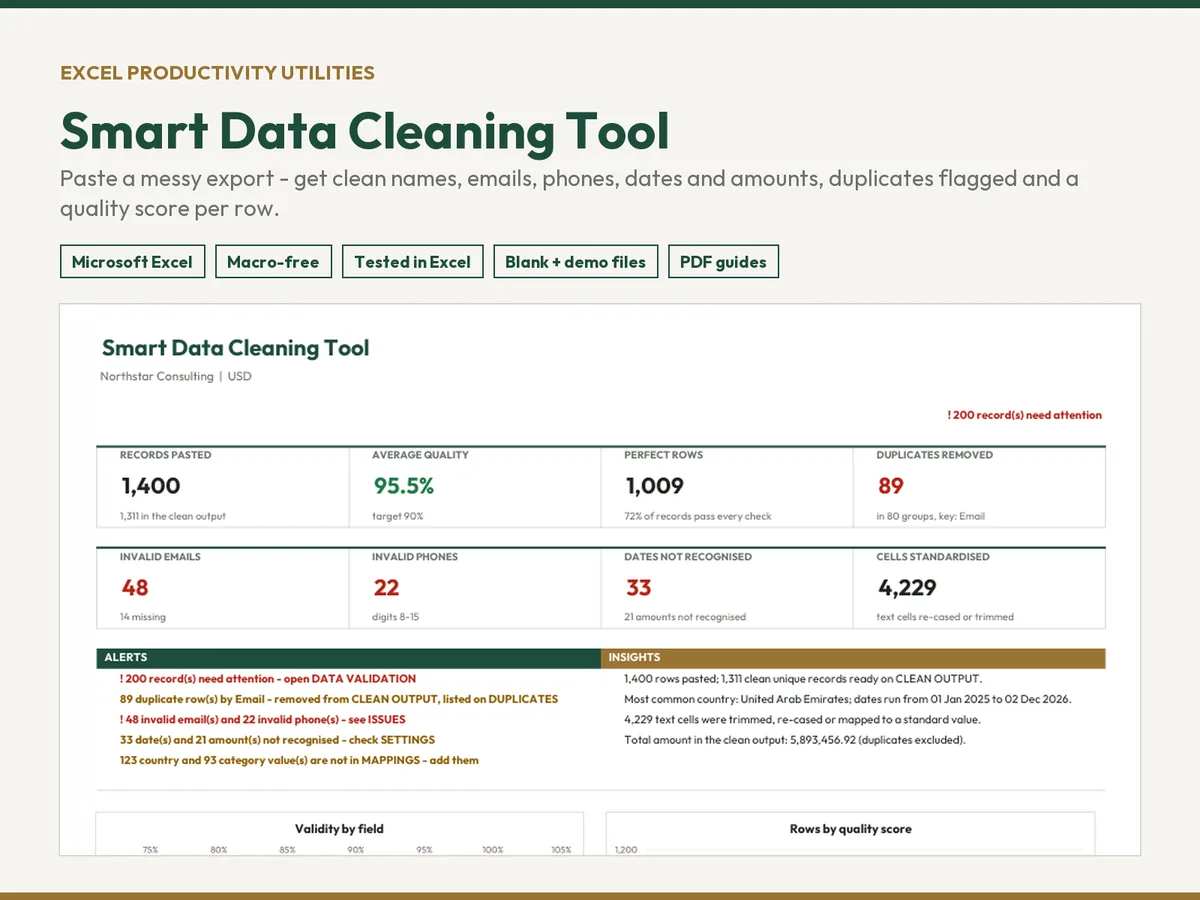
Paste a messy export - get clean names, emails, phones, dates and amounts, duplicates flagged and a quality score per row.
US$29one-time · no subscription
Tested in Microsoft Excel — 69 figures verified independently, 10,000-row test
Version 1.0 · Microsoft 365 / Excel 2021 or later (Windows & Mac) · Secure payment by Paddle
What it does
A formula-driven data cleaning workbook for CRM, e-commerce, HR and finance exports. Paste raw columns as they come; the workbook trims and re-cases text, validates emails, normalises phone numbers to international format, parses dates written in a dozen styles, turns '$1,234.50', 'AED 3,500' and '(250)' into numbers, maps country and category spellings to one standard value, flags duplicates by your chosen key and scores every row. The clean, de-duplicated table is ready to copy from CLEAN OUTPUT - no macros, no Power Query.
- Paste up to 10,000+ raw rows: name, email, phone, company, country, date, amount, category and ID
- Text clean-up: TRIM, non-breaking spaces and non-printing characters removed, Proper / UPPER case options
- Email validation (one @, domain with a dot, no spaces) and lower-casing
- Phone normalisation to +country-code format with digit-count validation
- Date parser for ISO, day/month/year, month/day/year, '15-Mar-2026', 'March 15, 2026' and real Excel dates
- Amount parser for currency codes and symbols, thousands separators, comma decimals and (negative) brackets
- Mapping table to standardise country and category spellings (UAE, U.A.E., uae -> United Arab Emirates)
- Duplicate detection by email, ID, name + phone or name + date + amount; first record kept
- Quality score and plain-English issue list per row; field completeness and validity summary
- CLEAN OUTPUT sheet with the de-duplicated, standardised table ready to copy
Who it's for
- Sales and CRM administrators importing lead lists
- E-commerce and marketing teams cleaning customer exports
- Finance and operations analysts preparing data for reporting
- HR teams consolidating employee records
- Consultants and students cleaning survey or research data
What's inside
| Sheet | What it's for |
|---|---|
| HOME | Welcome page, navigation, data-health and alert counters, quick start. |
| DASHBOARD | Executive KPIs, charts, alerts and insights. |
| SETTINGS | Company name, currency and every business rule: Name case, Company case, Ambiguous date order, Decimal style in raw amounts, Default country code, Minimum phone digits, Maximum phone digits, Duplicate key, Earliest valid year, Latest valid year, Quality target. |
| MAPPINGS | Master list: Standard value mappings. |
| RAW DATA | Your data: Raw data to clean. |
| DATA VALIDATION | Every row checked: missing fields, duplicates, invalid values and business-rule breaks. |
| CLEAN OUTPUT | Printable report: Clean, de-duplicated records. |
| ISSUES | Printable report: Rows that need attention. |
| DUPLICATES | Printable report: Duplicate groups. |
| CALCULATIONS | Protected calculation engine behind the dashboard and reports. |
| HELP | Column guide, troubleshooting, compatibility and privacy. |
| CHANGELOG | Version history. |
KPIs on the dashboard
- Records pasted
- Average quality
- Perfect rows
- Duplicates removed
- Invalid emails
- Invalid phones
- Dates not recognised
- Cells standardised
Printable reports
- Clean, de-duplicated records
- Rows that need attention
- Duplicate groups
What you get
- Smart_Data_Cleaning_Tool_Blank.xlsx — your working copy
- Smart_Data_Cleaning_Tool_Demo.xlsx — filled with fictional sample data
- PDF guides — quick start, user manual, FAQ, licence and version history
Compatibility
- Microsoft 365 / Excel 2021 or later (Windows & Mac)
- Excel for the web for data entry and the dashboard
- Not for Excel 2019 or earlier, Google Sheets or Numbers
- Macro-free, no external connections: your data never leaves your file
Good to know
- Covers nine common field types; other columns can be pasted into Raw Category or Raw Company for trimming, or kept in your source file.
- Duplicate detection is exact on the cleaned key (not fuzzy). Email validation checks the format, not whether the mailbox exists.
- Two-digit years are read as 20xx. Excel stores dates from 1900 onwards; earlier dates stay unrecognised.
Smart Data Cleaning Tool
US$29 once. Blank and demo workbooks plus PDF guides, downloaded from your account.