Excel Productivity Utilities
Excel Data Reconciliation Engine
Paste two lists - bank vs ledger, AR vs payments, system vs system - and every line is matched, explained or flagged.
US$49one-time · no subscription
Tested in Microsoft Excel — 81 figures verified independently, 10,000-row test
Version 1.0 · Microsoft 365 / Excel 2021 or later (Windows & Mac) · Secure payment by Paddle
What it does
A formula-driven reconciliation engine for any two transaction lists. Pass 1 matches by reference in groups - one-to-one, one-to-many, many-to-one and many-to-many - and accepts differences within your tolerance. Pass 2 pairs the remaining lines by amount and date window, oldest first. The workbook labels every line Matched, Exception or Unmatched, ages what is open, and proves the difference between the two totals line by line in a reconciliation statement.
- Side A and Side B lists with date, reference, description and amount - any source, any size
- Reference normalisation (case, spaces and wildcard characters ignored)
- Group matching by reference: 1:1, 1:many (one deposit = several invoices), many:1 and many:many
- Tolerance in money and in % - bank charges and rounding differences still match
- Second pass for lines without a usable reference: same amount within a date window, oldest first
- Sign option for lists that use opposite signs (debit vs credit)
- Exceptions list for reference matches whose amounts differ beyond tolerance
- Ageing of unmatched items (0-30, 31-60, 61-90, 90+ days) on both sides
- Reconciliation statement proving Total A - Total B = unmatched items + group differences
Who it's for
- Accountants doing bank and card reconciliations
- Accounts receivable and payable teams matching payments to invoices
- Finance analysts reconciling two systems or reports
- Auditors testing completeness between ledgers
- Payment, treasury and e-commerce operations teams
What's inside
| Sheet | What it's for |
|---|---|
| HOME | Welcome page, navigation, data-health and alert counters, quick start. |
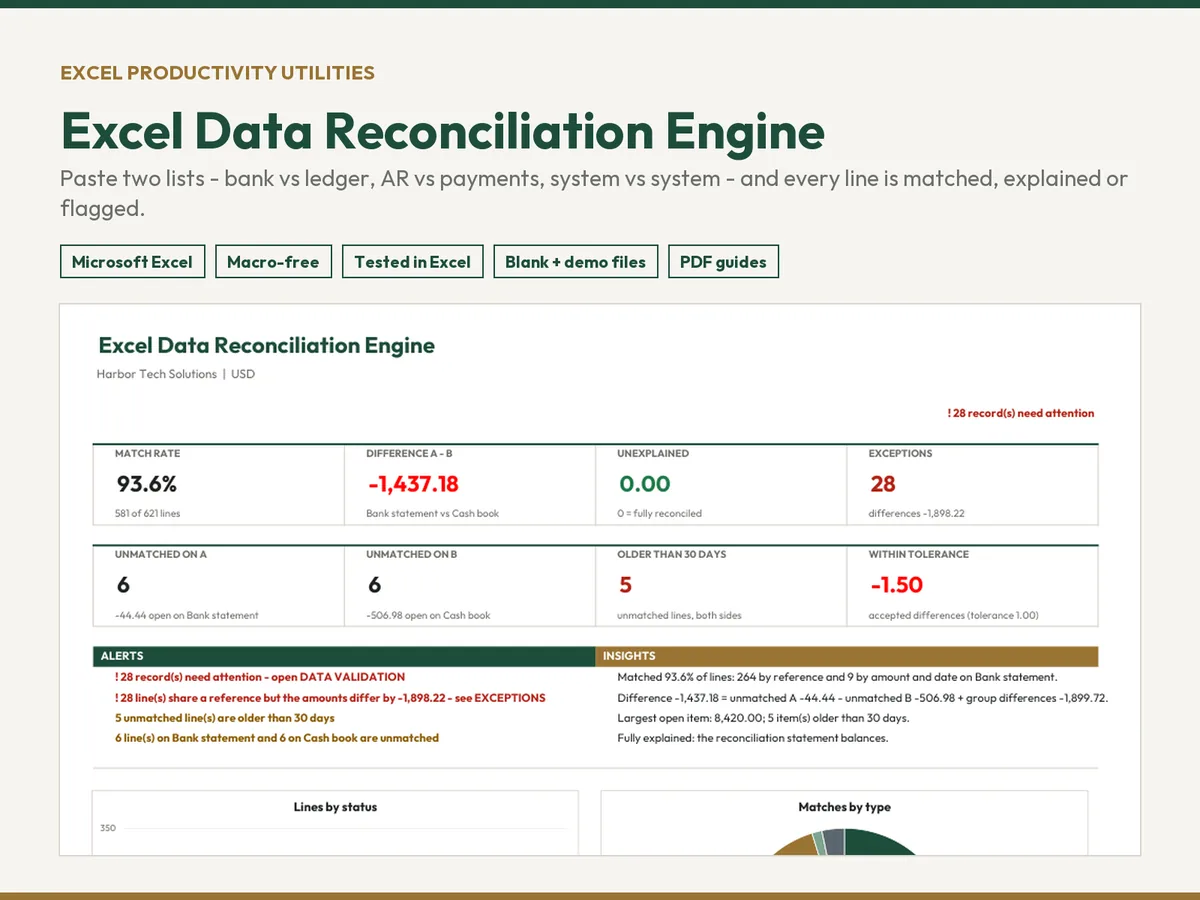
| DASHBOARD | Executive KPIs, charts, alerts and insights. |
| SETTINGS | Company name, currency and every business rule: Side A name, Side B name, Side B signs, Amount tolerance, Tolerance %, Date window (days), As-of date. |
| SIDE A | Your data: Side A transactions. |
| SIDE B | Your data: Side B transactions. |
| DATA VALIDATION | Every row checked: missing fields, duplicates, invalid values and business-rule breaks. |
| RECONCILIATION | Printable report: Reconciliation statement. |
| UNMATCHED A | Printable report: Unmatched lines - Side A. |
| UNMATCHED B | Printable report: Unmatched lines - Side B. |
| EXCEPTIONS | Printable report: Reference matches with amount differences. |
| CALCULATIONS | Protected calculation engine behind the dashboard and reports. |
| HELP | Column guide, troubleshooting, compatibility and privacy. |
| CHANGELOG | Version history. |
KPIs on the dashboard
- Match rate
- Difference A - B
- Unexplained
- Exceptions
- Unmatched on A
- Unmatched on B
- Older than 30 days
- Within tolerance
Printable reports
- Reconciliation statement
- Unmatched lines - Side A
- Unmatched lines - Side B
- Reference matches with amount differences
What you get
- Excel_Data_Reconciliation_Engine_Blank.xlsx — your working copy
- Excel_Data_Reconciliation_Engine_Demo.xlsx — filled with fictional sample data
- PDF guides — quick start, user manual, FAQ, licence and version history
Compatibility
- Microsoft 365 / Excel 2021 or later (Windows & Mac)
- Excel for the web for data entry and the dashboard
- Not for Excel 2019 or earlier, Google Sheets or Numbers
- Macro-free, no external connections: your data never leaves your file
Good to know
- Reference matching is exact after removing spaces, case and the characters * ? ~; similar but different references (typos) need correcting.
- Pass 2 needs identical amounts (to the cent); amount tolerance applies to reference groups only. Large lists (10,000+ lines per side) recalculate in a few seconds.
- No partial matching of one large line against a subset of many unreferenced lines (subset-sum); give those lines a common reference instead.
Excel Data Reconciliation Engine
US$49 once. Blank and demo workbooks plus PDF guides, downloaded from your account.