Excel Productivity Utilities
Multi-File Consolidation Tool
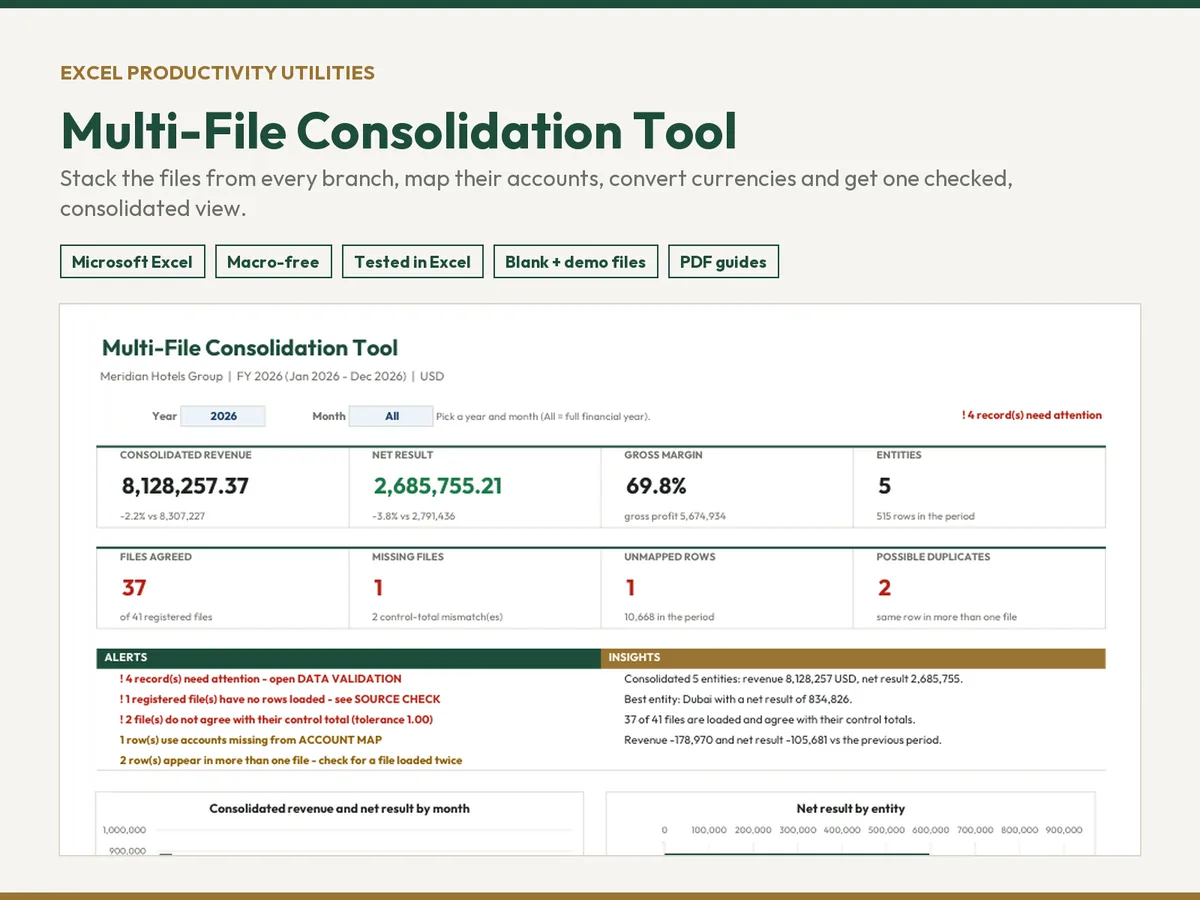
Stack the files from every branch, map their accounts, convert currencies and get one checked, consolidated view.
US$39one-time · no subscription
Tested in Microsoft Excel — 108 figures verified independently, 10,000-row test
Version 1.0 · Microsoft 365 / Excel 2021 or later (Windows & Mac) · Secure payment by Paddle
What it does
Consolidate monthly or quarterly files from branches, entities, departments or clients. Register each file with its entity, currency, FX rate, sign convention and control total, paste its rows into one stacked table (or load them with the included Power Query recipe), and the workbook maps every local account to your standard chart, converts to the reporting currency, flags missing files, control-total mismatches, unmapped accounts and possible duplicate loads, and produces a consolidated statement by entity and by quarter.
- Source register: file name, entity, currency, FX rate, sign convention, include flag and control total
- One stacked data table - paste each file's rows and pick its source; entity, currency and FX fill in automatically
- Account mapping table: local account names to standard accounts and statement groups
- Handles files that use trial-balance signs (credits negative) and files that report revenue as positive
- Control-total check per file: rows loaded, loaded total, difference and status (OK / Missing / Mismatch / Excluded)
- Possible duplicate detection across files (same date, account, description and amount)
- Consolidated statement by entity and by quarter as dynamic cross-tabs - new entities and accounts appear automatically
- Monthly revenue and net result trend, entity comparison and source health dashboard
- Step-by-step Power Query (Get Data > From Folder) recipe with ready-to-paste M code for automatic file loading
Who it's for
- Group finance and FP&A teams consolidating branches
- Accountants combining client or entity files
- Operations analysts merging regional sales or cost exports
- Franchise and multi-site business owners
- Auditors and consultants assembling data from several sources
What's inside
| Sheet | What it's for |
|---|---|
| HOME | Welcome page, navigation, data-health and alert counters, quick start. |
| DASHBOARD | Executive KPIs, charts, alerts and insights for the year/month you pick. |
| SETTINGS | Company name, currency, financial year and every business rule: Control total tolerance. |
| SOURCES | Your data: Source file register. |
| ACCOUNT MAP | Master list: Account mapping. |
| STACKED DATA | Your data: Stacked source data. |
| DATA VALIDATION | Every row checked: missing fields, duplicates, invalid values and business-rule breaks. |
| CONSOLIDATED | Printable report: Consolidated statement by entity. |
| BY QUARTER | Printable report: Consolidated statement by quarter. |
| SOURCE CHECK | Printable report: Source file check. |
| POWER QUERY | Printable report: Optional: load the files automatically with Power Query. |
| CALCULATIONS | Protected calculation engine behind the dashboard and reports. |
| HELP | Column guide, troubleshooting, compatibility and privacy. |
| CHANGELOG | Version history. |
KPIs on the dashboard
- Consolidated revenue
- Net result
- Gross margin
- Entities
- Files agreed
- Missing files
- Unmapped rows
- Possible duplicates
Printable reports
- Consolidated statement by entity
- Consolidated statement by quarter
- Source file check
- Optional: load the files automatically with Power Query
What you get
- Multi_File_Consolidation_Tool_Blank.xlsx — your working copy
- Multi_File_Consolidation_Tool_Demo.xlsx — filled with fictional sample data
- PDF guides — quick start, user manual, FAQ, licence and version history
Compatibility
- Microsoft 365 / Excel 2021 or later (Windows & Mac)
- Excel for the web for data entry and the dashboard
- Not for Excel 2019 or earlier, Google Sheets or Numbers
- Macro-free, no external connections: your data never leaves your file
Good to know
- Formula consolidation needs the rows pasted into STACKED DATA; automatic folder loading requires the one-time Power Query set-up described on the POWER QUERY sheet.
- One FX rate per file (e.g. monthly or quarterly average); no balance-sheet translation, minority interest or automatic intercompany elimination.
- CONSOLIDATED shows up to 7 entity columns side by side (the total column always includes every entity); BY QUARTER and CONSOLIDATED list up to 40 standard accounts.
Multi-File Consolidation Tool
US$39 once. Blank and demo workbooks plus PDF guides, downloaded from your account.