HR & Payroll
Employee Shift Planner
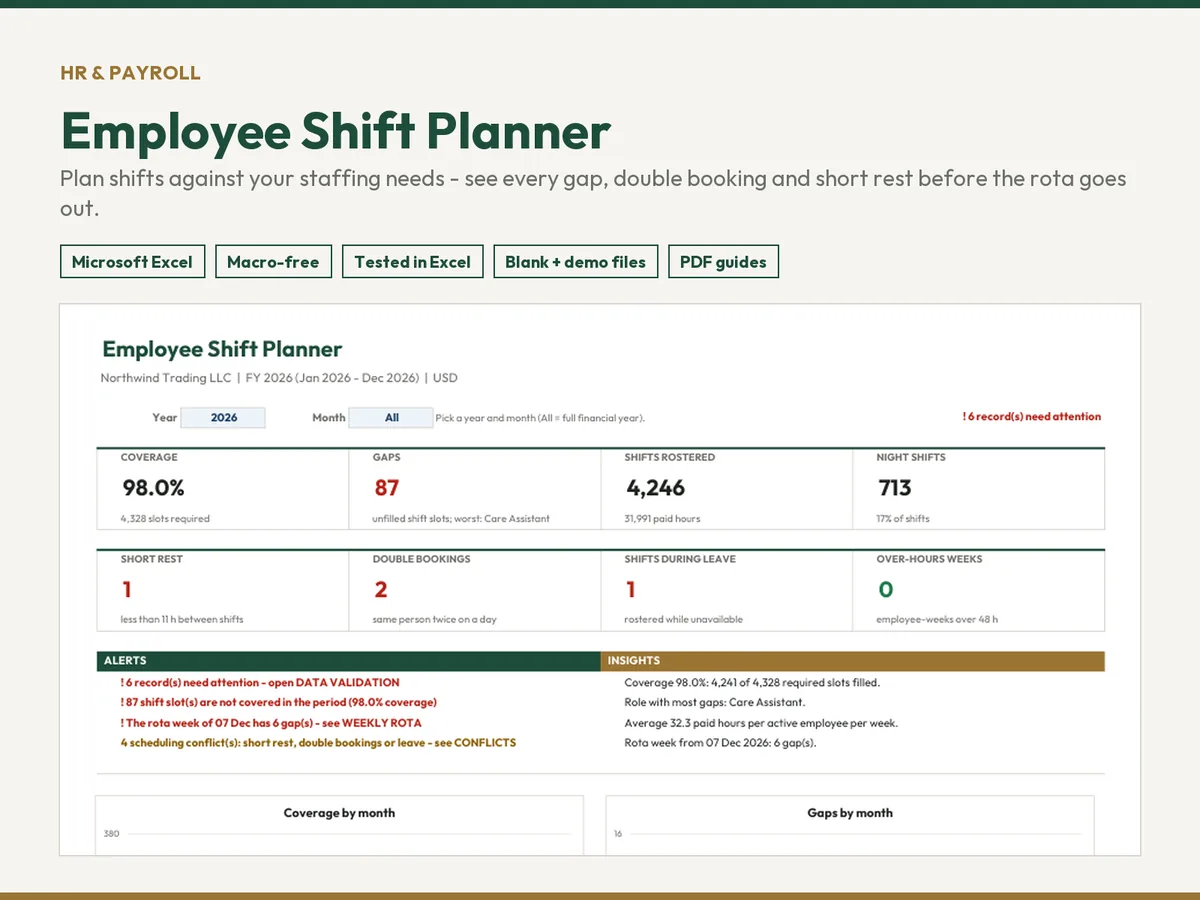
Plan shifts against your staffing needs - see every gap, double booking and short rest before the rota goes out.
US$24one-time · no subscription
Tested in Microsoft Excel — 72 figures verified independently, 10,000-row test
Version 1.0 · Microsoft 365 / Excel 2021 or later (Windows & Mac) · Secure payment by Paddle
What it does
A shift planning workbook for teams that work around the clock or across the week. Define your shifts and how many people of each role you need on each shift and day; then enter the roster. The workbook calculates hours, finds understaffed shifts day by day, and flags double bookings, rest periods shorter than your minimum, shifts on approved leave and weeks above the maximum hours. A printable weekly rota grid, coverage by role and month, and a staff hours summary make fair, compliant scheduling simple.
- Shift definitions with start, end and unpaid break; overnight shifts supported
- Staffing requirements per shift and role for every day, weekdays, weekends or a single weekday
- Day-by-day coverage check: required versus rostered, gaps and coverage rate
- Minimum rest between shifts check (e.g. 11 hours)
- Double-booking, unavailability / leave and weekly maximum-hours checks
- Printable weekly rota grid (employees x days) for any week
- Coverage by role and by month; hours, shifts and night shifts per employee
- Fairness view: hours versus contracted hours per employee
- Checks: unknown staff or shifts, overlapping requirement rows
Who it's for
- Care homes, clinics and hospitals
- Retail, restaurants and hotels
- Security and facilities companies
- Contact centres and warehouses
- Team leaders and rota planners
What's inside
| Sheet | What it's for |
|---|---|
| HOME | Welcome page, navigation, data-health and alert counters, quick start. |
| DASHBOARD | Executive KPIs, charts, alerts and insights for the year/month you pick. |
| SETTINGS | Company name, currency, financial year and every business rule: Rota week starting (Monday), Minimum rest between shifts (hours), Maximum hours per week. |
| SHIFTS | Master list: Shifts. |
| STAFF | Master list: Staff. |
| REQUIREMENTS | Master list: Staffing requirements. |
| UNAVAILABILITY | Your data: Leave and unavailability. |
| ROSTER | Your data: Roster. |
| DATA VALIDATION | Every row checked: missing fields, duplicates, invalid values and business-rule breaks. |
| WEEKLY ROTA | Printable report: Weekly rota. |
| COVERAGE | Printable report: Coverage and staff hours. |
| CONFLICTS | Printable report: Scheduling conflicts. |
| CALCULATIONS | Protected calculation engine behind the dashboard and reports. |
| HELP | Column guide, troubleshooting, compatibility and privacy. |
| CHANGELOG | Version history. |
KPIs on the dashboard
- Coverage
- Gaps
- Shifts rostered
- Night shifts
- Short rest
- Double bookings
- Shifts during leave
- Over-hours weeks
Printable reports
- Weekly rota
- Coverage and staff hours
- Scheduling conflicts
What you get
- Employee_Shift_Planner_Blank.xlsx — your working copy
- Employee_Shift_Planner_Demo.xlsx — filled with fictional sample data
- PDF guides — quick start, user manual, FAQ, licence and version history
Compatibility
- Microsoft 365 / Excel 2021 or later (Windows & Mac)
- Excel for the web for data entry and the dashboard
- Not for Excel 2019 or earlier, Google Sheets or Numbers
- Macro-free, no external connections: your data never leaves your file
Good to know
- Public holidays use the normal weekday requirement; add or remove roster rows as needed.
- Each shift/role/day combination should be covered by one requirement row; overlapping rows are flagged.
- Staff are matched to requirements by their single role on STAFF; multi-skilled staff count only in their main role.
- The rota is planned by hand - the workbook checks it but does not auto-assign shifts (no macros or solver).
Employee Shift Planner
US$24 once. Blank and demo workbooks plus PDF guides, downloaded from your account.