HR & Payroll
Employee Attendance System
Log clock-in and clock-out times - lateness, absences, early leaves, overtime and hours calculate themselves.
US$19one-time · no subscription
Tested in Microsoft Excel — 92 figures verified independently, 10,000-row test
Version 1.0 · Microsoft 365 / Excel 2021 or later (Windows & Mac) · Secure payment by Paddle
What it does
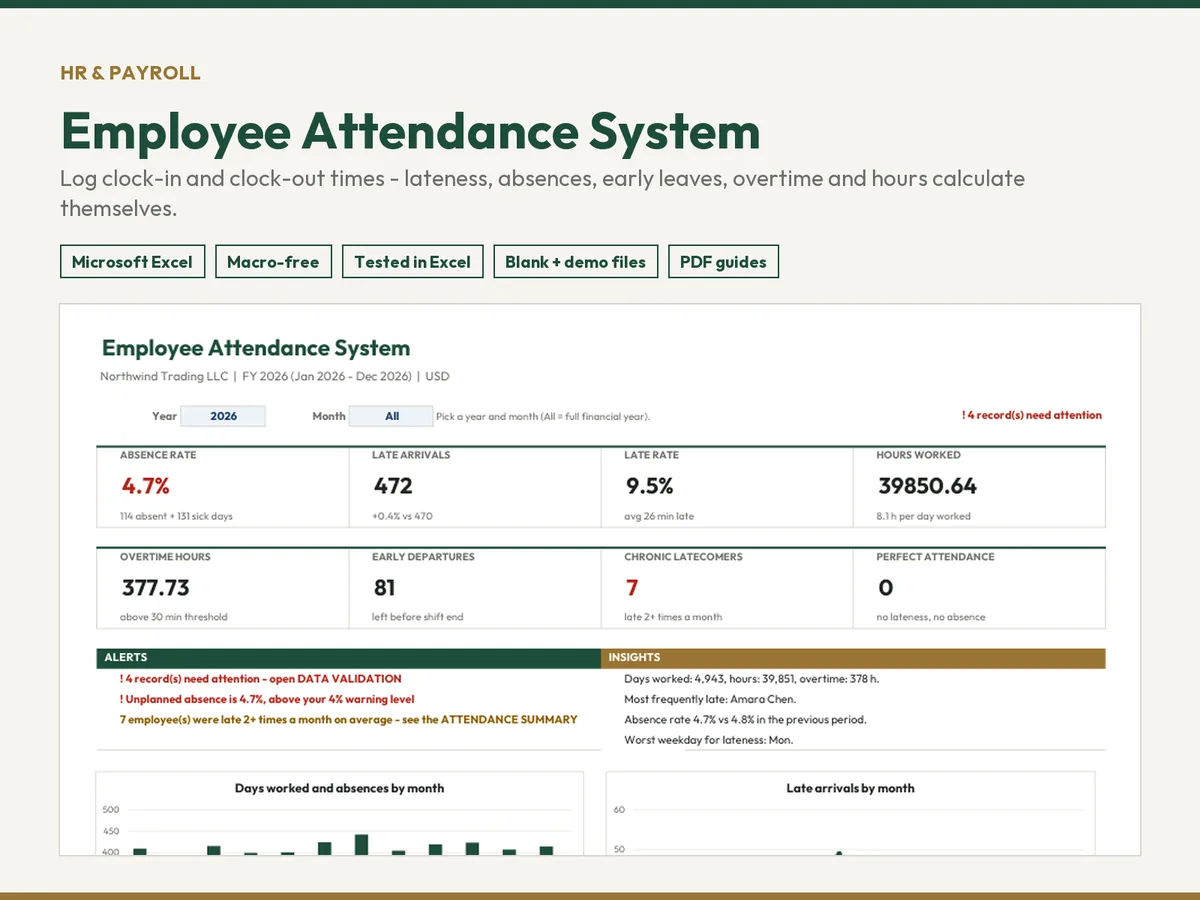
A daily attendance tracker for teams on fixed shifts. Define your shifts once, assign each employee a shift, then record (or paste from your time clock) each day's status and clock times. The workbook calculates hours worked, late minutes after a grace period, early departures, overtime above a threshold, absence and lateness rates, and flags chronic latecomers and missing punches - with a per-employee timesheet, an exceptions report and a dashboard.
- Shift definitions with start, end and unpaid break (overnight shifts supported)
- Hours worked from clock-in / clock-out times, minus the shift's unpaid break
- Late arrivals and early departures with a configurable grace period
- Overtime hours above a configurable minimum
- Absence, sick-leave, annual-leave, remote and half-day statuses
- Absence rate, lateness rate, chronic-lateness and perfect-attendance counts
- Lateness and absence patterns by weekday, department and month
- Printable timesheet for any employee and an exceptions report
- Checks: missing punches, duplicate days, unknown employees, invalid times
Who it's for
- Small business owners and shop managers
- HR officers and payroll clerks
- Clinic, school and office administrators
- Supervisors of shift teams
- Companies exporting data from a biometric time clock
What's inside
| Sheet | What it's for |
|---|---|
| HOME | Welcome page, navigation, data-health and alert counters, quick start. |
| DASHBOARD | Executive KPIs, charts, alerts and insights for the year/month you pick. |
| SETTINGS | Company name, currency, financial year and every business rule: Grace period (minutes), Overtime counted above (minutes), Chronic lateness: late arrivals per month, Absence rate warning level. |
| SHIFTS | Master list: Shift patterns. |
| EMPLOYEES | Your data: Employees. |
| ATTENDANCE | Your data: Daily attendance. |
| DATA VALIDATION | Every row checked: missing fields, duplicates, invalid values and business-rule breaks. |
| ATTENDANCE SUMMARY | Printable report: Attendance summary by employee. |
| TIMESHEET | Printable report: Employee timesheet. |
| EXCEPTIONS | Printable report: Attendance exceptions. |
| CALCULATIONS | Protected calculation engine behind the dashboard and reports. |
| HELP | Column guide, troubleshooting, compatibility and privacy. |
| CHANGELOG | Version history. |
KPIs on the dashboard
- Absence rate
- Late arrivals
- Late rate
- Hours worked
- Overtime hours
- Early departures
- Chronic latecomers
- Perfect attendance
Printable reports
- Attendance summary by employee
- Employee timesheet
- Attendance exceptions
What you get
- Employee_Attendance_System_Blank.xlsx — your working copy
- Employee_Attendance_System_Demo.xlsx — filled with fictional sample data
- PDF guides — quick start, user manual, FAQ, licence and version history
Compatibility
- Microsoft 365 / Excel 2021 or later (Windows & Mac)
- Excel for the web for data entry and the dashboard
- Not for Excel 2019 or earlier, Google Sheets or Numbers
- Macro-free, no external connections: your data never leaves your file
Good to know
- One shift per employee (their usual shift). For rotating rosters use the Employee Shift Planner.
- One clock-in and one clock-out per day; split shifts need two rows with different notes (the duplicate check will flag them for review).
- Times must be hh:mm in 24-hour format, as text or Excel times.
Employee Attendance System
US$19 once. Blank and demo workbooks plus PDF guides, downloaded from your account.