E-commerce & Creators
YouTube Revenue Analytics Dashboard
Paste your channel analytics export - see RPM, revenue trends, Shorts vs long-form and what you really earn.
US$19one-time · no subscription
Tested in Microsoft Excel — 108 figures verified independently, 10,000-row test
Version 1.0 · Microsoft 365 / Excel 2021 or later (Windows & Mac) · Secure payment by Paddle
What it does
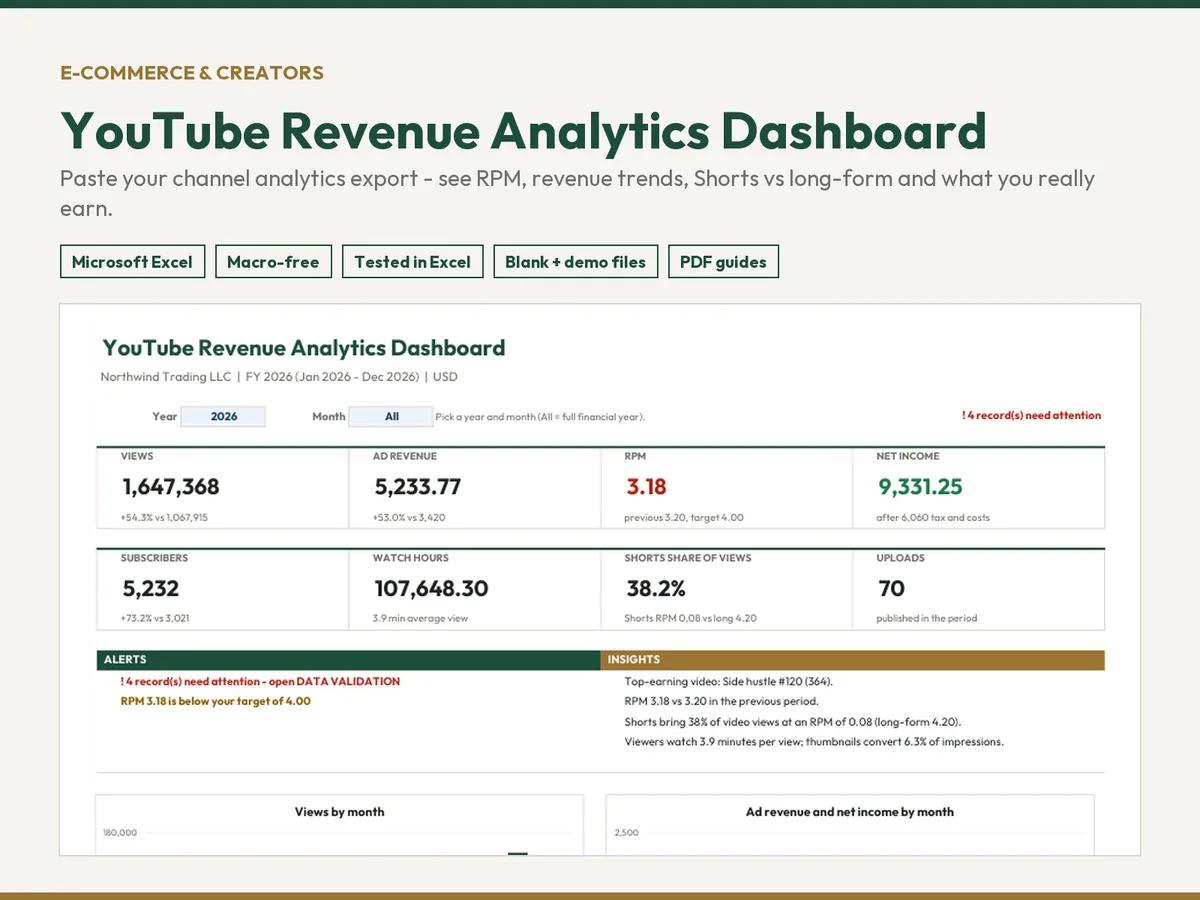
A revenue and performance dashboard for creators who publish on YouTube. Paste the daily totals and the per-video table exported from YouTube Studio analytics; the workbook tracks views, watch time, subscribers, estimated revenue and RPM by month with previous-period comparisons, splits Shorts from long-form, ranks videos by revenue, RPM and click-through rate, and turns revenue into net income after tax withholding and production costs. Independent tool, not affiliated with or endorsed by YouTube or Google.
- Paste daily channel totals (Date, Views, Watch time, Subscribers, Estimated revenue, Impressions)
- Paste the per-video table with publish dates as exported (e.g. 'Nov 3, 2026')
- Monthly views, watch hours, subscribers, revenue and RPM with previous-period change
- Shorts vs long-form split by duration threshold (configurable)
- Top videos by revenue, RPM, views and impression click-through rate
- Net income after configurable tax withholding and production / tool costs
- Other income (sponsorships, affiliates, memberships) alongside ad revenue
- Average view duration, revenue per 1,000 subscribers gained and upload consistency
- Checks for unreadable dates, duplicate days/videos and negative values
Who it's for
- YouTube creators in the Partner Programme
- Channel managers and MCN analysts
- Faceless and automation channels
- Creators with sponsorship and production costs
- Educators and businesses running a channel
What's inside
| Sheet | What it's for |
|---|---|
| HOME | Welcome page, navigation, data-health and alert counters, quick start. |
| DASHBOARD | Executive KPIs, charts, alerts and insights for the year/month you pick. |
| SETTINGS | Company name, currency, financial year and every business rule: Shorts if duration up to (seconds), Tax withholding on revenue, Target RPM. |
| DAILY | Your data: Daily channel totals (paste). |
| VIDEOS | Your data: Videos (paste per-video export). |
| OTHER MONEY | Your data: Other income and costs. |
| DATA VALIDATION | Every row checked: missing fields, duplicates, invalid values and business-rule breaks. |
| INCOME REPORT | Printable report: Channel income statement. |
| MONTHLY | Printable report: Monthly channel performance. |
| TOP VIDEOS | Printable report: Top videos. |
| CALCULATIONS | Protected calculation engine behind the dashboard and reports. |
| HELP | Column guide, troubleshooting, compatibility and privacy. |
| CHANGELOG | Version history. |
KPIs on the dashboard
- Views
- Ad revenue
- RPM
- Net income
- Subscribers
- Watch hours
- Shorts share of views
- Uploads
Printable reports
- Channel income statement
- Monthly channel performance
- Top videos
What you get
- YouTube_Revenue_Analytics_Dashboard_Blank.xlsx — your working copy
- YouTube_Revenue_Analytics_Dashboard_Demo.xlsx — filled with fictional sample data
- PDF guides — quick start, user manual, FAQ, licence and version history
Compatibility
- Microsoft 365 / Excel 2021 or later (Windows & Mac)
- Excel for the web for data entry and the dashboard
- Not for Excel 2019 or earlier, Google Sheets or Numbers
- Macro-free, no external connections: your data never leaves your file
Good to know
- Shorts vs long-form is decided by duration only; videos exactly at the threshold count as Shorts.
- Publish dates as text are read with Excel's DATEVALUE (English month names such as 'Nov 3, 2026').
YouTube Revenue Analytics Dashboard
US$19 once. Blank and demo workbooks plus PDF guides, downloaded from your account.