Sales, CRM & Business
Sales Commission Calculator
Tiered commission, quota attainment and bonuses for every sales person - calculated from your sales list.
US$19one-time · no subscription
Tested in Microsoft Excel — 76 figures verified independently, 10,000-row test
Version 1.0 · Microsoft 365 / Excel 2021 or later (Windows & Mac) · Secure payment by Paddle
What it does
Paste your sales, set each rep's quota and define your commission tiers once. The workbook works out quota attainment for any month or year, applies marginal or retroactive tier rates, adds attainment bonuses, excludes cancelled or unpaid deals according to your rule and prints a commission statement per rep with the tier-by-tier working, so payouts are transparent and disputes disappear.
- Commission tiers by quota attainment with your own rates
- Marginal (each band at its rate) or retroactive (whole sale at the reached rate) methods
- Monthly quotas scaled automatically to a month or a full year
- Commission on invoiced or on paid sales only; cancelled sales excluded
- Attainment bonus above a threshold you set
- Rep payout: base salary + commission + bonus and effective commission rate
- Printable commission statement with the tier-by-tier working
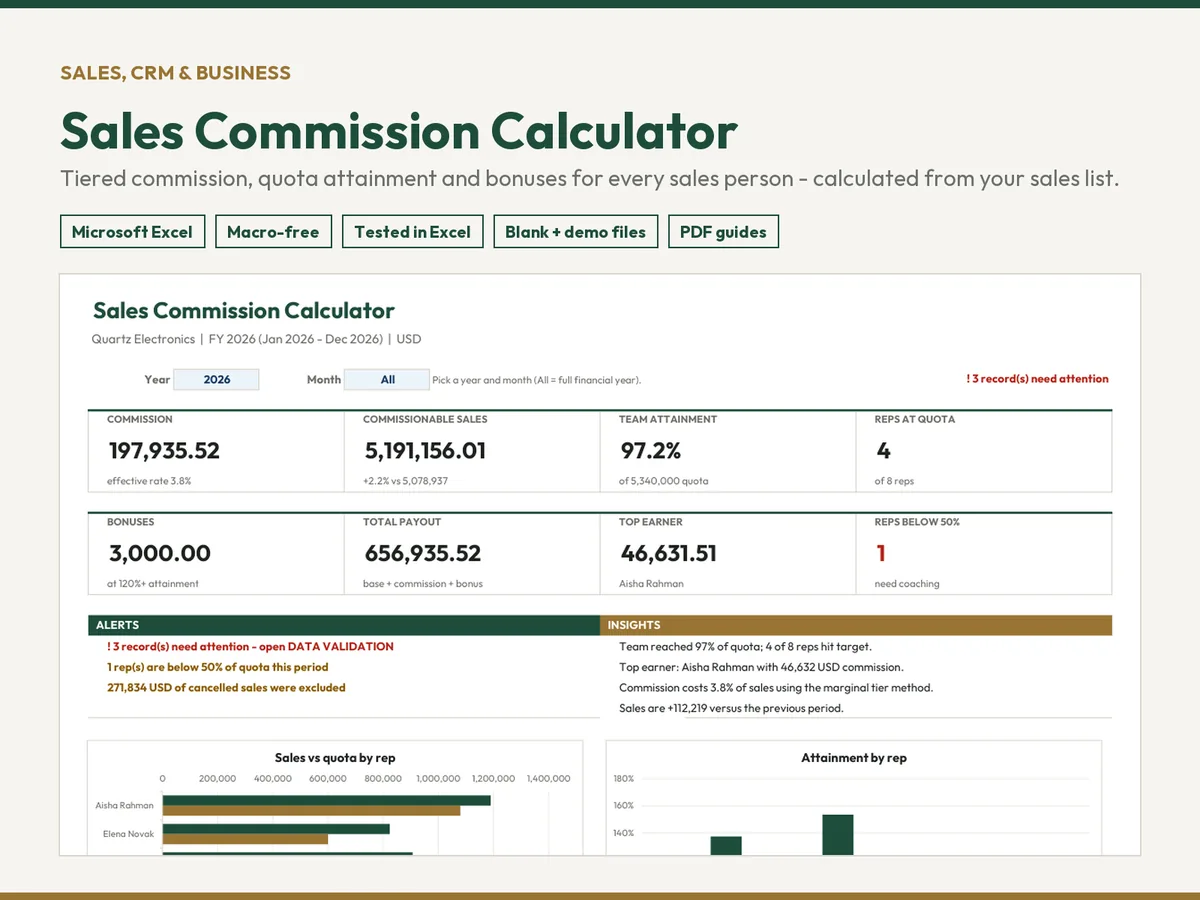
- Team dashboard: attainment, reps at quota, top earner and sales trend
- Duplicate invoice and unknown-rep checks
Who it's for
- Sales managers and sales operations
- Business owners paying commission
- Payroll and finance teams
- Commission-based sales reps
- Agencies and distributors
What's inside
| Sheet | What it's for |
|---|---|
| HOME | Welcome page, navigation, data-health and alert counters, quick start. |
| DASHBOARD | Executive KPIs, charts, alerts and insights for the year/month you pick. |
| SETTINGS | Company name, currency, financial year and every business rule: Tier method, Pay commission on, Bonus at or above attainment, Bonus amount per period. |
| TIERS | Master list: Commission tiers. |
| REPS | Your data: Sales reps and quotas. |
| SALES | Your data: Sales. |
| DATA VALIDATION | Every row checked: missing fields, duplicates, invalid values and business-rule breaks. |
| STATEMENT | Printable report: Commission statement. |
| PAYOUT | Printable report: Commission payout summary. |
| CALCULATIONS | Protected calculation engine behind the dashboard and reports. |
| HELP | Column guide, troubleshooting, compatibility and privacy. |
| CHANGELOG | Version history. |
KPIs on the dashboard
- Commission
- Commissionable sales
- Team attainment
- Reps at quota
- Bonuses
- Total payout
- Top earner
- Reps below 50%
Printable reports
- Commission statement
- Commission payout summary
What you get
- Sales_Commission_Calculator_Blank.xlsx — your working copy
- Sales_Commission_Calculator_Demo.xlsx — filled with fictional sample data
- PDF guides — quick start, user manual, FAQ, licence and version history
Compatibility
- Microsoft 365 / Excel 2021 or later (Windows & Mac)
- Excel for the web for data entry and the dashboard
- Not for Excel 2019 or earlier, Google Sheets or Numbers
- Macro-free, no external connections: your data never leaves your file
Good to know
- One commission plan for all reps; for different plans per team, use one copy of the workbook per plan.
- The bonus is assessed on the selected period's attainment (month or full year), not month by month inside a year.
- Split credit between several reps is not supported; enter each rep's share as its own sale line.
Sales Commission Calculator
US$19 once. Blank and demo workbooks plus PDF guides, downloaded from your account.