Project Management & Productivity
Resource Allocation Planner
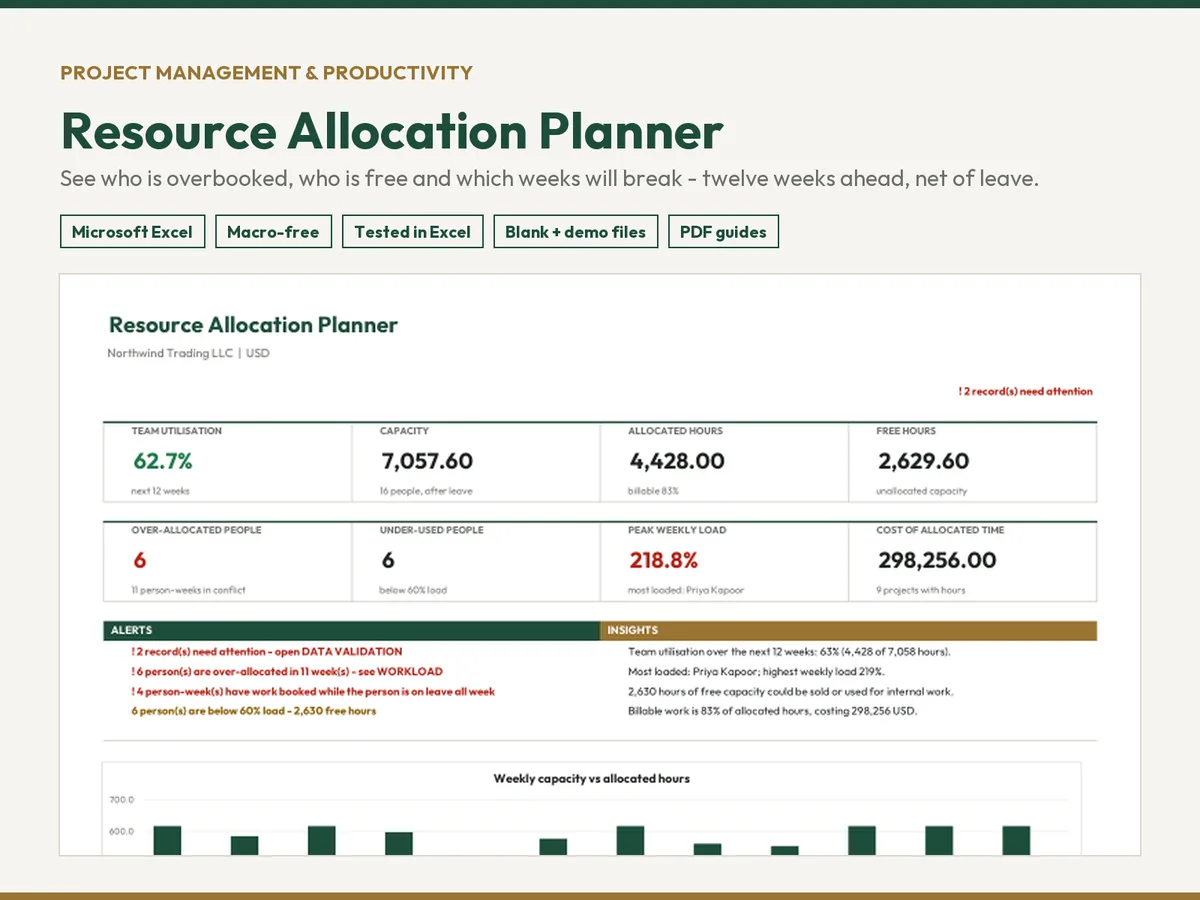
See who is overbooked, who is free and which weeks will break - twelve weeks ahead, net of leave.
US$29one-time · no subscription
Tested in Microsoft Excel — 57 figures verified independently, 10,000-row test
Version 1.0 · Microsoft 365 / Excel 2021 or later (Windows & Mac) · Secure payment by Paddle
What it does
A resource planning workbook for teams that share people across projects. List your people with weekly hours, record leave, and allocate people to projects in hours per week for a date range. The workbook builds a 12-week capacity and load grid per person (capacity reduced by leave), shows utilisation by person, team and week, flags over-allocated person-weeks and under-used people, sums hours and cost by project and billable share, and prints a workload report.
- People list with team, role, weekly hours and cost rate
- Leave and holiday register that reduces weekly capacity
- Allocations in hours per week for any date range, by project
- 12-week load grid per person (load % of capacity per week)
- Over-allocation conflicts: person-weeks above your threshold, peak load per person
- Under-used people and free capacity (bench hours)
- Weekly team capacity vs allocated hours and utilisation trend
- Hours, cost and billable share by project and by team
- Checks: allocations to unknown people or projects, end before start, work booked over full leave
Who it's for
- Agency, studio and consultancy managers
- PMOs and delivery leads
- IT and engineering team leads
- Professional services firms
- Operations managers scheduling shared specialists
What's inside
| Sheet | What it's for |
|---|---|
| HOME | Welcome page, navigation, data-health and alert counters, quick start. |
| DASHBOARD | Executive KPIs, charts, alerts and insights. |
| SETTINGS | Company name, currency and every business rule: Plan start (a Monday), Over-allocated above, Under-used below. |
| PEOPLE | Master list: People and weekly load. |
| PROJECTS | Master list: Projects. |
| LEAVE | Your data: Leave and holidays. |
| ALLOCATIONS | Your data: Allocations. |
| DATA VALIDATION | Every row checked: missing fields, duplicates, invalid values and business-rule breaks. |
| WORKLOAD | Printable report: 12-week workload by person. |
| PERSON PLAN | Printable report: Allocations for one person. |
| CALCULATIONS | Protected calculation engine behind the dashboard and reports. |
| HELP | Column guide, troubleshooting, compatibility and privacy. |
| CHANGELOG | Version history. |
KPIs on the dashboard
- Team utilisation
- Capacity
- Allocated hours
- Free hours
- Over-allocated people
- Under-used people
- Peak weekly load
- Cost of allocated time
Printable reports
- 12-week workload by person
- Allocations for one person
What you get
- Resource_Allocation_Planner_Blank.xlsx — your working copy
- Resource_Allocation_Planner_Demo.xlsx — filled with fictional sample data
- PDF guides — quick start, user manual, FAQ, licence and version history
Compatibility
- Microsoft 365 / Excel 2021 or later (Windows & Mac)
- Excel for the web for data entry and the dashboard
- Not for Excel 2019 or earlier, Google Sheets or Numbers
- Macro-free, no external connections: your data never leaves your file
Good to know
- The plan window is fixed at 12 weeks; allocations are weekly hours, not day-by-day schedules.
- Public holidays must be entered as leave for each person they apply to.
Resource Allocation Planner
US$29 once. Blank and demo workbooks plus PDF guides, downloaded from your account.