Inventory & Procurement
Procurement Spend Analyzer
Paste your AP invoice lines and see who you really spend with, where the leakage is and what to consolidate.
US$29one-time · no subscription
Tested in Microsoft Excel — 112 figures verified independently, 10,000-row test
Version 1.0 · Microsoft 365 / Excel 2021 or later (Windows & Mac) · Secure payment by Paddle
What it does
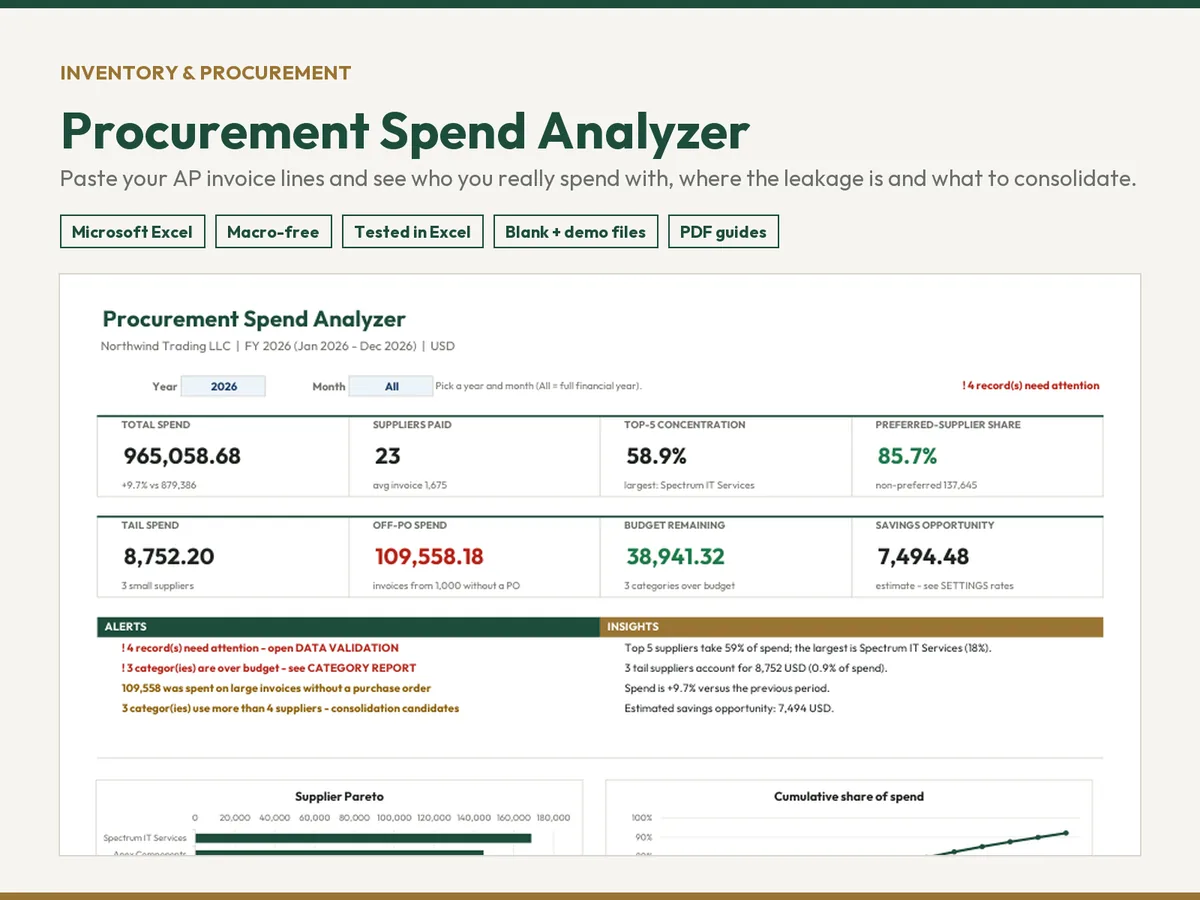
A spend-analysis workbook for procurement and finance teams. Paste invoice or payment lines from any accounting system and map them to suppliers and categories once; the workbook builds the spend cube by supplier, category and department, a Pareto of suppliers, concentration and tail-spend analysis, spend with non-preferred suppliers and without a purchase order, category budgets versus actuals, fragmented categories with too many suppliers, possible duplicate payments, and a configurable estimate of the savings opportunity.
- Spend cube: supplier x category x department x month from raw invoice lines
- Supplier Pareto with cumulative share and top-5 concentration
- Tail spend: small suppliers below a threshold you set
- Maverick spend: non-preferred suppliers and invoices without a PO
- Category budgets vs actual with over-budget alerts (pro-rated for months)
- Fragmented categories: more suppliers than your target - consolidation candidates
- Possible duplicate payments (same supplier, amount and date) and repeated invoice numbers
- Year-on-year comparison and monthly trend
- Savings opportunity estimate with your own savings rates
Who it's for
- Procurement and purchasing managers
- CFOs and finance controllers
- Internal auditors
- Category managers
- Consultants running spend reviews
- SME owners reviewing supplier costs
What's inside
| Sheet | What it's for |
|---|---|
| HOME | Welcome page, navigation, data-health and alert counters, quick start. |
| DASHBOARD | Executive KPIs, charts, alerts and insights for the year/month you pick. |
| SETTINGS | Company name, currency, financial year and every business rule: Tail spend threshold (per year), Target suppliers per category, Savings rate: consolidating tail spend, Savings rate: moving maverick spend to preferred, Large invoice without PO from. |
| CATEGORIES | Master list: Spend categories and budgets. |
| SUPPLIERS | Master list: Supplier list. |
| SPEND | Your data: Invoice lines. |
| DATA VALIDATION | Every row checked: missing fields, duplicates, invalid values and business-rule breaks. |
| CATEGORY REPORT | Printable report: Spend by category. |
| SUPPLIER REPORT | Printable report: Supplier Pareto and leakage. |
| CALCULATIONS | Protected calculation engine behind the dashboard and reports. |
| HELP | Column guide, troubleshooting, compatibility and privacy. |
| CHANGELOG | Version history. |
KPIs on the dashboard
- Total spend
- Suppliers paid
- Top-5 concentration
- Preferred-supplier share
- Tail spend
- Off-PO spend
- Budget remaining
- Savings opportunity
Printable reports
- Spend by category
- Supplier Pareto and leakage
What you get
- Procurement_Spend_Analyzer_Blank.xlsx — your working copy
- Procurement_Spend_Analyzer_Demo.xlsx — filled with fictional sample data
- PDF guides — quick start, user manual, FAQ, licence and version history
Compatibility
- Microsoft 365 / Excel 2021 or later (Windows & Mac)
- Excel for the web for data entry and the dashboard
- Not for Excel 2019 or earlier, Google Sheets or Numbers
- Macro-free, no external connections: your data never leaves your file
Good to know
- Amounts are assumed to be in one reporting currency and net of tax; convert foreign-currency invoices before pasting.
- Duplicate detection flags same supplier, same amount and same date; duplicates with different dates must be reviewed manually.
Procurement Spend Analyzer
US$29 once. Blank and demo workbooks plus PDF guides, downloaded from your account.