Finance & Accounting
Month-End Closing Manager
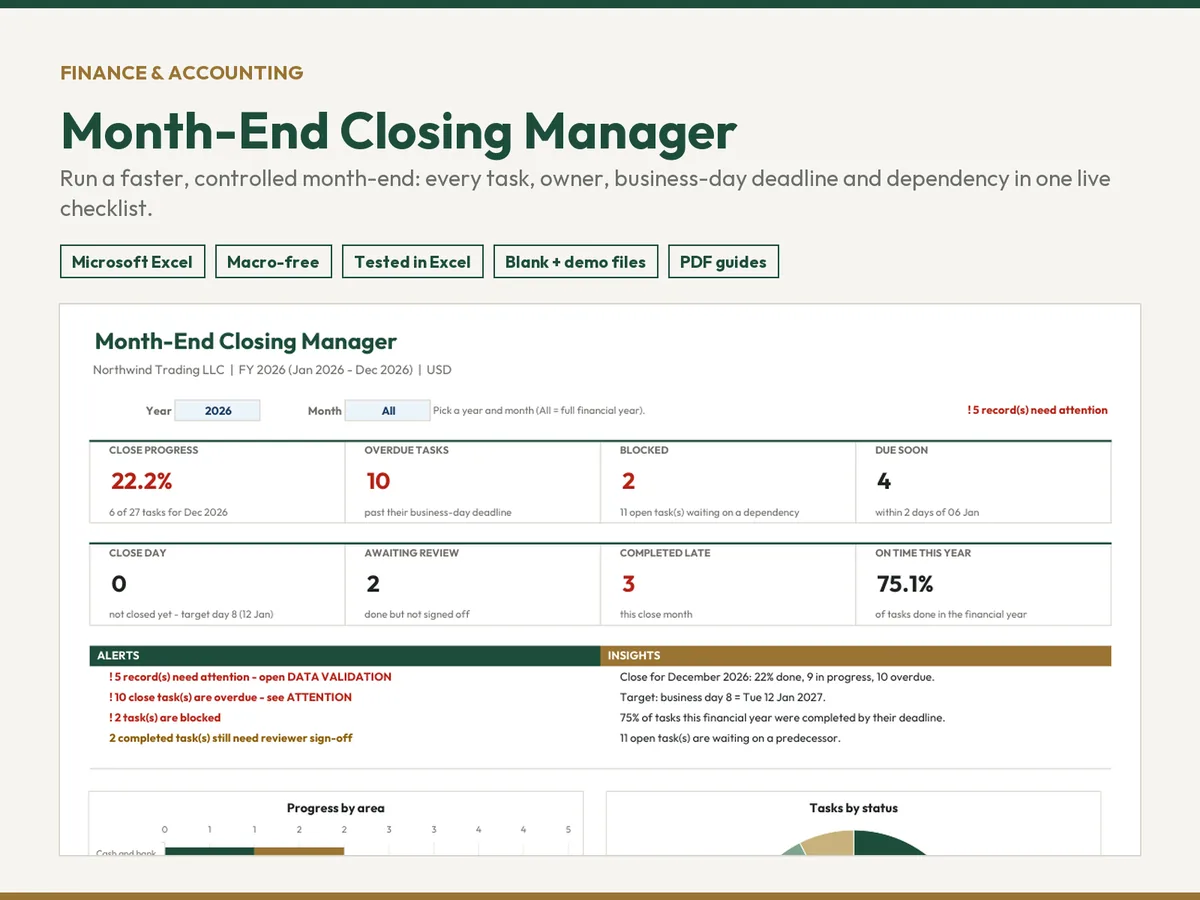
Run a faster, controlled month-end: every task, owner, business-day deadline and dependency in one live checklist.
US$24one-time · no subscription
Tested in Microsoft Excel — 57 figures verified independently
Version 1.0 · Microsoft 365 / Excel 2021 or later (Windows & Mac) · Secure payment by Paddle
What it does
Set up your close checklist once - task, area, owner, reviewer, business-day deadline relative to month end, frequency (monthly, quarterly, year-end) and dependencies. Each month just log status updates. The workbook builds the checklist for the selected close month with real deadlines (your weekend), shows progress by area and owner, flags overdue, blocked and unreviewed tasks, and measures the close day achieved against your target month after month.
- Reusable close checklist with area, owner, reviewer and dependencies
- Deadlines as business days before/after month end (WORKDAY with your weekend)
- Monthly, quarterly and year-end tasks switch on automatically
- Status log per close month: not started, in progress, done, blocked, N/A
- Overdue, due-soon, blocked and late-completed flags
- Review sign-off tracking (maker-checker)
- Dependency check: task waiting on an unfinished predecessor
- Close day achieved vs target, trended for the year
- Progress by area and workload by owner
Who it's for
- Financial controllers and accounting managers
- Accountants and bookkeepers running the close
- CFOs of small and mid-sized companies
- Outsourced accounting firms closing for clients
- Audit-ready finance teams
What's inside
| Sheet | What it's for |
|---|---|
| HOME | Welcome page, navigation, data-health and alert counters, quick start. |
| DASHBOARD | Executive KPIs, charts, alerts and insights for the year/month you pick. |
| SETTINGS | Company name, currency, financial year and every business rule: As-of date (today), Weekend, Target close day (business days), Due soon window (days). |
| CHECKLIST | Master list: Close checklist. |
| STATUS LOG | Your data: Status updates by close month. |
| DATA VALIDATION | Every row checked: missing fields, duplicates, invalid values and business-rule breaks. |
| CLOSE CHECKLIST | Printable report: Month-end close checklist. |
| ATTENTION | Printable report: Tasks needing attention. |
| CLOSE HISTORY | Printable report: Close performance this financial year. |
| CALCULATIONS | Protected calculation engine behind the dashboard and reports. |
| HELP | Column guide, troubleshooting, compatibility and privacy. |
| CHANGELOG | Version history. |
KPIs on the dashboard
- Close progress
- Overdue tasks
- Blocked
- Due soon
- Close day
- Awaiting review
- Completed late
- On time this year
Printable reports
- Month-end close checklist
- Tasks needing attention
- Close performance this financial year
What you get
- Month_End_Closing_Manager_Blank.xlsx — your working copy
- Month_End_Closing_Manager_Demo.xlsx — filled with fictional sample data
- PDF guides — quick start, user manual, FAQ, licence and version history
Compatibility
- Microsoft 365 / Excel 2021 or later (Windows & Mac)
- Excel for the web for data entry and the dashboard
- Not for Excel 2019 or earlier, Google Sheets or Numbers
- Macro-free, no external connections: your data never leaves your file
Good to know
- Public holidays are not excluded from business-day deadlines; adjust the Day Offset in holiday months.
- Close day measures the last completion date; reopened tasks should be logged with their final completion date.
Month-End Closing Manager
US$24 once. Blank and demo workbooks plus PDF guides, downloaded from your account.