Personal Finance & Investment
Loan and EMI Calculator
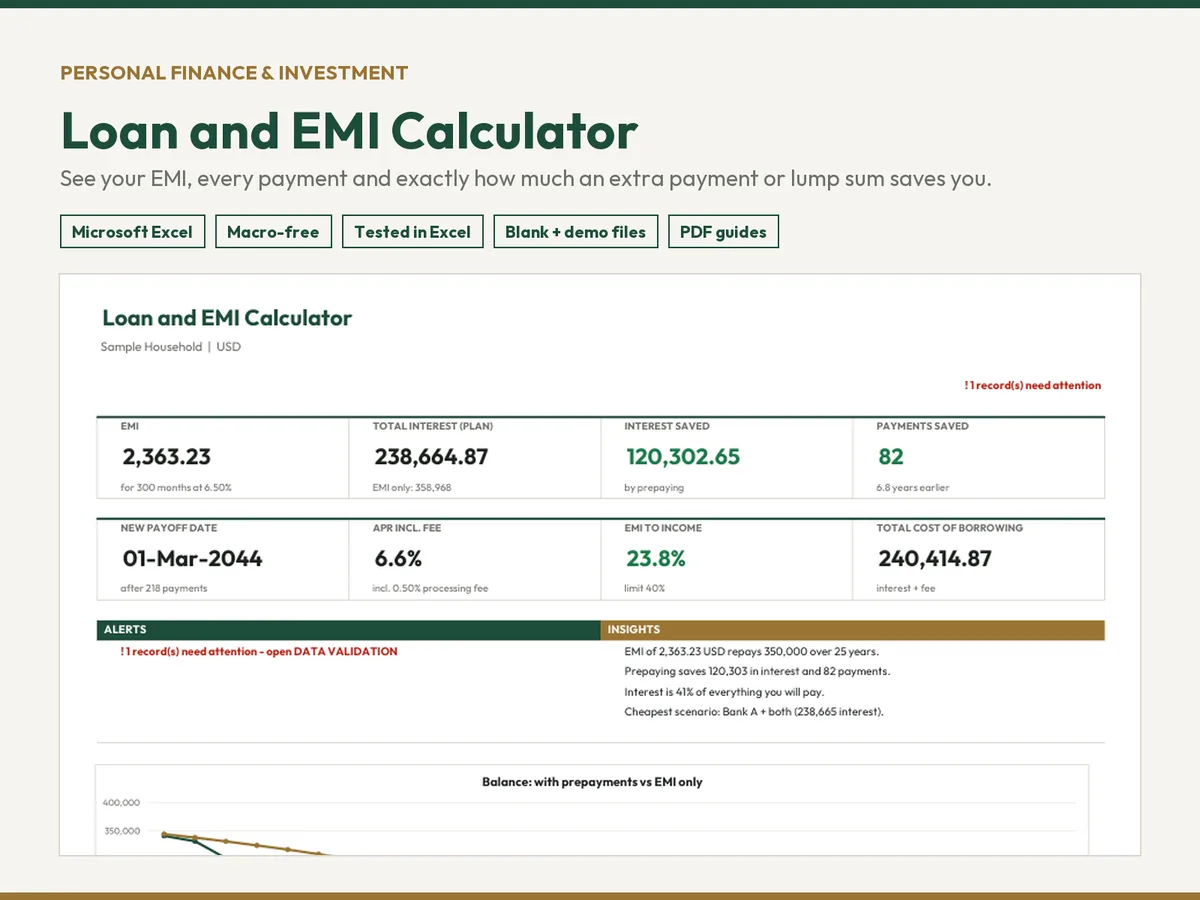
See your EMI, every payment and exactly how much an extra payment or lump sum saves you.
US$12one-time · no subscription
Tested in Microsoft Excel — 50 figures verified independently
Version 1.0 · Microsoft 365 / Excel 2021 or later (Windows & Mac) · Secure payment by Paddle
What it does
Enter a loan amount, rate and term and the workbook calculates the EMI, builds the full month-by-month amortisation schedule and a yearly summary, and shows the effect of a regular extra payment and a one-off lump-sum prepayment - with the choice to shorten the tenure or reduce the EMI. A scenario table compares up to 20 loan offers or prepayment plans side by side on total interest and payoff time.
- EMI calculation for any amount, rate and term up to 30 years
- Month-by-month amortisation schedule with dates, interest, principal and balance
- Regular extra payment and one-off lump-sum prepayment
- Reduce-tenure or reduce-EMI option after a lump sum, like most banks offer
- Interest saved, months saved and new payoff date
- APR including the processing fee
- Yearly summary with original vs prepayment balance chart
- Scenario table comparing loan offers on EMI, total interest and payoff months
- Affordability check: EMI as a share of monthly income
Who it's for
- Home buyers comparing mortgage offers
- Car and personal loan borrowers
- Students planning loan repayments
- Financial advisers and mortgage brokers
- Small business owners taking term loans
What's inside
| Sheet | What it's for |
|---|---|
| HOME | Welcome page, navigation, data-health and alert counters, quick start. |
| DASHBOARD | Executive KPIs, charts, alerts and insights. |
| SETTINGS | Company name, currency and every business rule: Loan amount, Annual interest rate, Term (years, max 30), First payment date, Extra payment every month, Lump-sum prepayment, Lump sum paid with payment no., After the lump sum, Processing fee (% of loan), Monthly net income, Max EMI as % of income. |
| SCENARIOS | Master list: Loan offers and prepayment scenarios. |
| DATA VALIDATION | Every row checked: missing fields, duplicates, invalid values and business-rule breaks. |
| LOAN SUMMARY | Printable report: Loan summary. |
| SCHEDULE | Printable report: Amortisation schedule. |
| COMPARISON | Printable report: Scenario comparison. |
| CALCULATIONS | Protected calculation engine behind the dashboard and reports. |
| HELP | Column guide, troubleshooting, compatibility and privacy. |
| CHANGELOG | Version history. |
KPIs on the dashboard
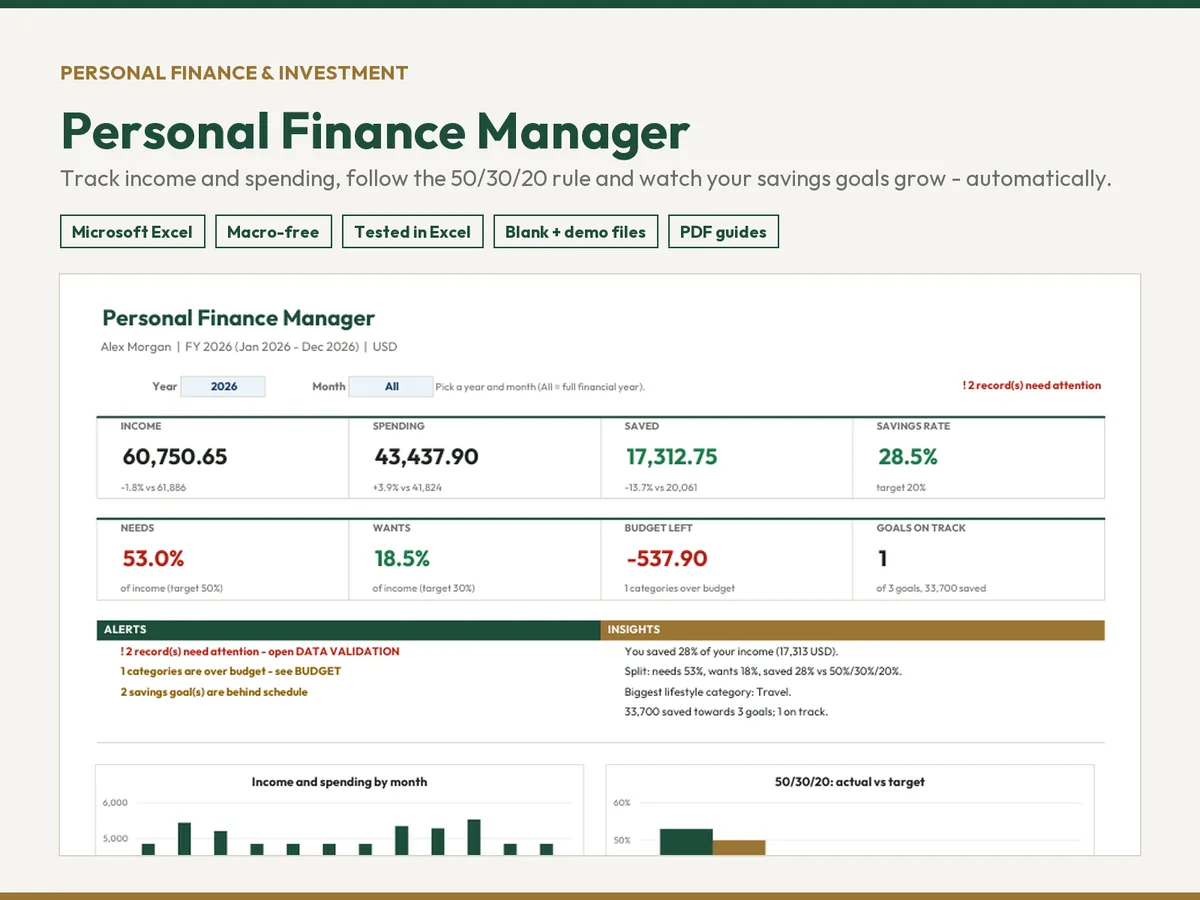
- EMI
- Total interest (plan)
- Interest saved
- Payments saved
- New payoff date
- APR incl. fee
- EMI to income
- Total cost of borrowing
Printable reports
- Loan summary
- Amortisation schedule
- Scenario comparison
What you get
- Loan_and_EMI_Calculator_Blank.xlsx — your working copy
- Loan_and_EMI_Calculator_Demo.xlsx — filled with fictional sample data
- PDF guides — quick start, user manual, FAQ, licence and version history
Compatibility
- Microsoft 365 / Excel 2021 or later (Windows & Mac)
- Excel for the web for data entry and the dashboard
- Not for Excel 2019 or earlier, Google Sheets or Numbers
- Macro-free, no external connections: your data never leaves your file
Good to know
- Fixed interest rate for the whole term; variable or step-up rates are not modelled (use scenarios to compare rates).
- Monthly payments only, up to 30 years (360 payments). Scenarios use tenure reduction for lump sums.
- Prepayment penalties, insurance and taxes are not included.
Loan and EMI Calculator
US$12 once. Blank and demo workbooks plus PDF guides, downloaded from your account.