Finance & Accounting
Expense Management System
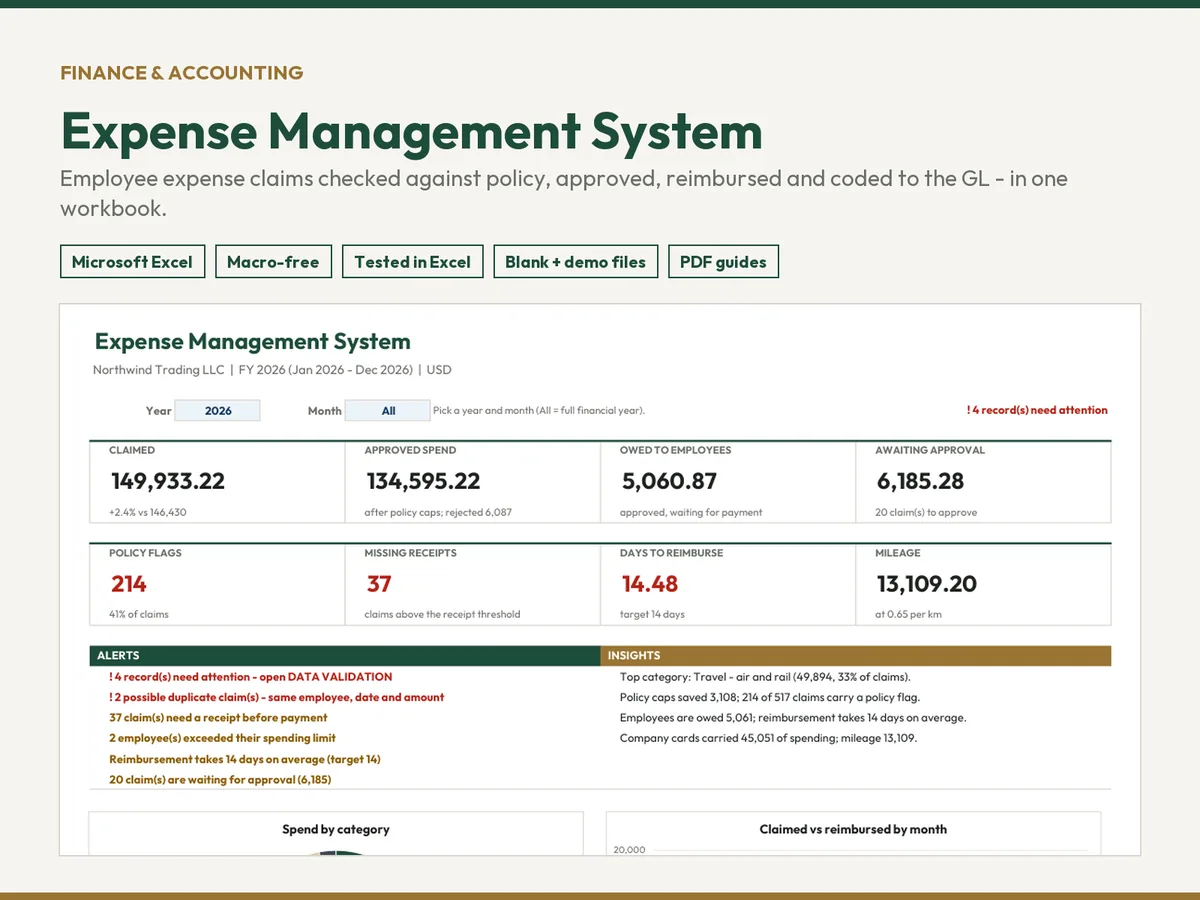
Employee expense claims checked against policy, approved, reimbursed and coded to the GL - in one workbook.
US$19one-time · no subscription
Tested in Microsoft Excel — 92 figures verified independently, 10,000-row test
Version 1.0 · Microsoft 365 / Excel 2021 or later (Windows & Mac) · Secure payment by Paddle
What it does
Employees' claims go in one table. The workbook applies your expense policy - per-claim limits by category, receipt thresholds, weekend and possible-duplicate checks - calculates mileage at your rate, tracks each claim from submitted to approved to reimbursed, shows what is owed to each employee and how fast you pay, and summarises approved spend by general-ledger code ready for posting.
- Expense claims with category, payment method, receipt and status
- Per-claim policy limits by category with optional capping
- Receipt-required threshold and missing-receipt flags
- Possible duplicate and weekend claim detection
- Mileage claims calculated from distance x your rate
- Amounts owed per employee and claims awaiting reimbursement
- Average days to reimburse against your target
- Approved spend by GL code for the accounting journal
- Monthly employee spending limits
Who it's for
- Small and mid-sized businesses
- Finance and accounts payable teams
- Office and operations managers
- Consultancies and field-sales teams
- Non-profits reimbursing staff and volunteers
What's inside
| Sheet | What it's for |
|---|---|
| HOME | Welcome page, navigation, data-health and alert counters, quick start. |
| DASHBOARD | Executive KPIs, charts, alerts and insights for the year/month you pick. |
| SETTINGS | Company name, currency, financial year and every business rule: Mileage category name, Mileage rate per km, Cap reimbursement at policy limit, Reimbursement target (days). |
| EMPLOYEES | Master list: Employees. |
| CATEGORIES | Master list: Expense categories and policy. |
| CLAIMS | Your data: Expense claims. |
| DATA VALIDATION | Every row checked: missing fields, duplicates, invalid values and business-rule breaks. |
| REIMBURSEMENTS | Printable report: Reimbursements due to employees. |
| POLICY EXCEPTIONS | Printable report: Policy exceptions. |
| GL SUMMARY | Printable report: Approved expenses by GL code. |
| CALCULATIONS | Protected calculation engine behind the dashboard and reports. |
| HELP | Column guide, troubleshooting, compatibility and privacy. |
| CHANGELOG | Version history. |
KPIs on the dashboard
- Claimed
- Approved spend
- Owed to employees
- Awaiting approval
- Policy flags
- Missing receipts
- Days to reimburse
- Mileage
Printable reports
- Reimbursements due to employees
- Policy exceptions
- Approved expenses by GL code
What you get
- Expense_Management_System_Blank.xlsx — your working copy
- Expense_Management_System_Demo.xlsx — filled with fictional sample data
- PDF guides — quick start, user manual, FAQ, licence and version history
Compatibility
- Microsoft 365 / Excel 2021 or later (Windows & Mac)
- Excel for the web for data entry and the dashboard
- Not for Excel 2019 or earlier, Google Sheets or Numbers
- Macro-free, no external connections: your data never leaves your file
Good to know
- Single currency; convert foreign receipts before entering them. No per-diem or tax (VAT) reclaim calculation.
- Monthly limits are checked against total claims in the selected month (or 12 x limit for a full year).
Expense Management System
US$19 once. Blank and demo workbooks plus PDF guides, downloaded from your account.