Finance & Accounting
Bank Reconciliation Tool
Paste the bank statement and the cash book - matching, outstanding items and the reconciliation are done for you.
US$39one-time · no subscription
Tested in Microsoft Excel — 60 figures verified independently, 10,000-row test
Version 1.0 · Microsoft 365 / Excel 2021 or later (Windows & Mac) · Secure payment by Paddle
What it does
Paste your bank statement lines and your ledger (cash book) lines. The workbook matches them one-to-one: first by reference with an amount tolerance, then by exact amount within a date tolerance. Everything left over becomes a reconciling item - deposits in transit, unpresented payments, bank charges and receipts not yet recorded - and the bank reconciliation statement proves the adjusted bank and ledger balances agree.
- Two-pass one-to-one matching: reference + amount tolerance, then amount + date tolerance
- Configurable date tolerance (days) and amount tolerance for reference matches
- Deposits in transit and unpresented payments found automatically
- Bank-only items (charges, interest, direct debits) listed for posting to the ledger
- Bank reconciliation statement with unreconciled difference check
- Items dated outside the tolerance flagged separately for review
- Daily bank vs ledger balance chart for the statement period
- Match rate and reconciling-item KPIs
- Works with any bank export: money in / money out columns
Who it's for
- Bookkeepers and accountants closing the month
- Small-business owners reconciling their own bank
- Finance teams with several bank accounts
- Auditors and accounting students
- Treasury and cash management staff
What's inside
| Sheet | What it's for |
|---|---|
| HOME | Welcome page, navigation, data-health and alert counters, quick start. |
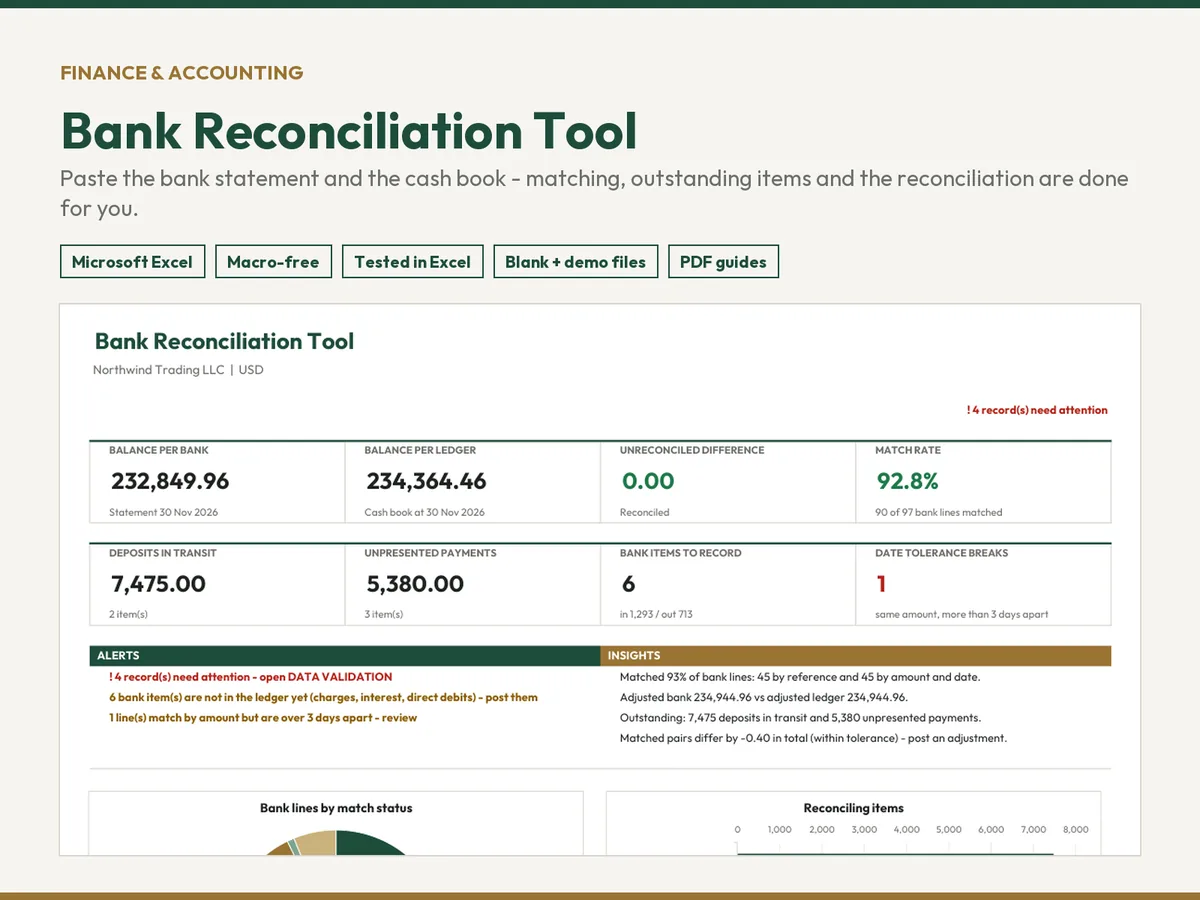
| DASHBOARD | Executive KPIs, charts, alerts and insights. |
| SETTINGS | Company name, currency and every business rule: Statement start date, Statement end date, Opening balance per bank statement, Opening balance per ledger, Date tolerance (days), Amount tolerance for reference matches. |
| BANK STATEMENT | Your data: Bank statement lines. |
| LEDGER | Your data: Ledger / cash book lines. |
| DATA VALIDATION | Every row checked: missing fields, duplicates, invalid values and business-rule breaks. |
| RECONCILIATION | Printable report: Bank reconciliation statement. |
| BANK ITEMS TO POST | Printable report: Bank items not in the ledger. |
| OUTSTANDING ITEMS | Printable report: Outstanding ledger items. |
| CALCULATIONS | Protected calculation engine behind the dashboard and reports. |
| HELP | Column guide, troubleshooting, compatibility and privacy. |
| CHANGELOG | Version history. |
KPIs on the dashboard
- Balance per bank
- Balance per ledger
- Unreconciled difference
- Match rate
- Deposits in transit
- Unpresented payments
- Bank items to record
- Date tolerance breaks
Printable reports
- Bank reconciliation statement
- Bank items not in the ledger
- Outstanding ledger items
What you get
- Bank_Reconciliation_Tool_Blank.xlsx — your working copy
- Bank_Reconciliation_Tool_Demo.xlsx — filled with fictional sample data
- PDF guides — quick start, user manual, FAQ, licence and version history
Compatibility
- Microsoft 365 / Excel 2021 or later (Windows & Mac)
- Excel for the web for data entry and the dashboard
- Not for Excel 2019 or earlier, Google Sheets or Numbers
- Macro-free, no external connections: your data never leaves your file
Good to know
- Amount matching is one-to-one: one bank line to one ledger line. A single bank deposit covering several ledger receipts must be split or given a matching reference.
- Same-amount lines pair in order of appearance; keep both sheets sorted by date for best results. References should be unique on each side.
- Very large files (10,000+ lines on each side) take longer to recalculate because every line is compared with the other sheet.
Bank Reconciliation Tool
US$39 once. Blank and demo workbooks plus PDF guides, downloaded from your account.